Get your CARS & BS in order before you migrate. 😂
This simple mnemonic covers the six essential data sources for building a complete URL list:
- Crawl
- Analytics
- Redirects (existing)
- Sitemap
- Backlinks
- Search Console
Gather from all six, and you won’t miss a URL that matters.
| URL Gathering Task | Purpose |
|---|---|
| Crawl domain for HTML URLs | Discover all live pages |
| Categorize by status code | Identify redirect needs |
| Gather backlinked URLs | Preserve SEO equity |
| Crawl XML sitemap | Capture declared important pages |
| Export Search Console data | Find indexed URLs |
| Gather analytics URLs | Identify traffic-generating pages |
| Audit existing redirect tables | Prevent redirect chains |
| Unify all datasets | Create comprehensive redirect list |
What Datasets Should I Use to Compile Comprehensive URL Lists?
A successful site migration requires gathering URLs from multiple sources to ensure no important page is missed. Relying on a single source will leave gaps in your redirect coverage.
Essential Data Sources
| Source | What It Captures |
|---|---|
| Domain Crawl | All discoverable HTML URLs |
| XML Sitemap | URLs you’ve declared important |
| Google Search Console | URLs Google knows about |
| Analytics | URLs with actual traffic |
| Backlink Tools | URLs with external links |
| Existing Redirect Tables | Current redirect mappings |
The Multi-Source Approach
Each source captures URLs the others might miss:
- Crawlers miss orphan pages not linked internally
- Sitemaps may be outdated or incomplete
- Search Console only shows indexed URLs
- Analytics misses pages with zero traffic
- Backlink tools focus on externally linked pages
How Do I Crawl the Domain to Gather HTML URLs?
Start by crawling your entire domain using a tool like Screaming Frog, Sitebulb, or similar web crawlers. This discovers all HTML pages that are linked within your site structure.
Crawl Configuration
Recommended settings:
- Crawl depth: Unlimited (or high enough to reach all pages)
- Respect robots.txt: Disable for migration purposes (you need ALL URLs)
- Follow internal links: Enabled
- Crawl outside start folder: Disabled (stay on your domain)
- Store HTML: Optional but useful for content comparison
What to Extract
Export the following from your crawl:
URL Address
Status Code
Indexability
Canonical URL
Meta Robots
Title
Tips for Handling Large Sites
For sites with 100,000+ URLs:
- Segment by subdirectory: Crawl
/blog/,/products/,/pages/separately - Use list mode: Feed known URLs directly instead of discovering
- Increase memory allocation: Screaming Frog may need 8GB+ RAM
- Run overnight: Large crawls can take hours
How Should I Categorize URLs by Status Code?
After crawling, categorize all discovered URLs by their HTTP status code. Each category requires different handling in your redirect strategy.
Status Code Categories
200 OK URLs: Your primary redirect source list
| Subcategory | Description | Action |
|---|---|---|
| Indexable | Can appear in search results | High priority redirects |
| Non-Indexable | Blocked from indexing | Evaluate redirect need |
| Canonicalized | Points to another URL | Redirect to canonical target |
| NoIndex | Meta noindex tag present | Lower priority redirects |
| UTM Parameters | Marketing tracking URLs | Usually exclude from redirects |
| Filter Parameters | Faceted navigation URLs | Usually exclude from redirects |
301/302 Redirect URLs: Already redirecting
- Document existing redirect destinations
- Ensure new redirects point to final destinations
- Avoid creating redirect chains
404 Not Found URLs: Broken but potentially important
- Check for backlinks pointing to these URLs
- Review Search Console for indexed 404s
- May need redirects if they have SEO value
Should I Include URLs with Status Codes Other Than 200?
Many migration projects focus only on 200 status pages, but 301/302 and 404 URLs are equally important for maintaining SEO equity and user experience.
Why 301/302 URLs Matter
Existing redirects represent URLs that once had value:
- External sites may still link to the old URLs
- Search engines may have the old URLs indexed
- Users may have bookmarked the old URLs
If you ignore existing redirects:
Old URL → Current Redirect → New Site (broken)
With proper handling:
Old URL → New Site (direct)
Why 404 URLs Matter
A 404 status doesn’t mean a URL is worthless:
| 404 Scenario | Redirect Need |
|---|---|
| Has backlinks from external sites | Yes: preserve link equity |
| Appears in Search Console | Yes: Google knows about it |
| Shows traffic in analytics | Yes: users are looking for it |
| Recently deleted content | Maybe: evaluate relevance |
| Never had traffic or links | No: safe to ignore |
Gathering 404 Data
Export 404s from:
- Screaming Frog crawl results
- Google Search Console coverage report
- Server access logs
- Analytics (pages with zero pageviews but sessions)
What URL Variations Should I Account For?
The same page can be accessed via multiple URL variations. Missing any variation means broken links and lost traffic.
Critical URL Variations
| Variation Type | Example A | Example B |
|---|---|---|
| www vs non-www | www.example.com/page |
example.com/page |
| Trailing slash | /products/ |
/products |
| Capitalization | /Products/Widget |
/products/widget |
| URL encoding | /search?q=hello%20world |
/search?q=hello world |
| Protocol | https:// |
http:// |
| Index files | /folder/index.html |
/folder/ |
How Variations Cause Problems
External links and bookmarks may use any variation:
Backlink uses: example.com/Blog/Post-Title
Your redirect: www.example.com/blog/post-title

Result: 404 error, redirect not matched
Gathering All Variations
- Check backlink reports: External sites use inconsistent formats
- Review server logs: See actual requested URLs
- Test manually: Try common variations of important pages
- Search Console: Shows URL variations Google has encountered
Standardization Strategy
Decide on your canonical format, then redirect all variations:
| Old Path | Redirect To |
|---|---|
| /Products/ | /products |
| /PRODUCTS/ | /products |
| /products | /products |
| /Products | /products |
How Do I Gather URLs with Backlinks?
URLs with external backlinks carry SEO value that transfers through 301 redirects. Backlink analysis tools reveal which URLs have this equity.
Common Backlink Tools
| Tool | Key Feature |
|---|---|
| Ahrefs | Site Explorer → Best by Links |
| Semrush | Backlink Analytics → Indexed Pages |
Export Process (General Steps)
- Enter your domain in the tool’s site analysis feature
- Navigate to the pages or URLs report (shows which pages receive backlinks)
- Export the full list of pages with backlinks
- Filter to your domain’s URLs only
Key Data Points to Capture
| Data Point | Purpose |
|---|---|
| Target URL | The URL receiving backlinks |
| Referring Domains | Number of unique sites linking |
| Total Backlinks | Overall link count |
| Link Quality Score | Authority indicator (varies by tool) |
Prioritization Framework
Not all backlinked URLs are equal:
| Referring Domains | Priority | Action |
|---|---|---|
| 50+ | Critical | Must redirect |
| 10-49 | High | Should redirect |
| 2-9 | Medium | Redirect if practical |
| 1 | Low | Evaluate individually |
Don’t Forget 404 Backlinks
Most backlink tools show links pointing to URLs that return 404:
- Look for a status code filter or broken backlinks report
- Filter to show only 404 URLs
- Export these URLs (they need redirects despite being broken)
Why Should I Crawl the XML Sitemap?
Your XML sitemap represents URLs you’ve explicitly told search engines are important. These should all be included in your redirect planning.
What Sitemaps Reveal
| Sitemap Element | Migration Use |
|---|---|
| URL list | Pages you consider important |
| Last modified dates | Recently updated content |
| Priority values | Your content hierarchy |
| Change frequency | Content update patterns |
Extracting Sitemap URLs
Method 1: Direct download
https://example.com/sitemap.xml
https://example.com/sitemap_index.xml
Method 2: Screaming Frog
- Mode → List
- Upload → Download Sitemap
- Enter sitemap URL
- Crawl to validate URLs
Method 3: Search Console
- Sitemaps report shows submitted URLs
- Index coverage shows which are indexed
Sitemap vs Crawl Comparison
Compare your sitemap URLs against crawl results:
| Scenario | Meaning | Action |
|---|---|---|
| In sitemap, found in crawl | Normal | Include in redirects |
| In sitemap, not in crawl | Orphan page | Verify page exists, include |
| In crawl, not in sitemap | Missing from sitemap | Include in redirects |
How Do I Export URLs from Google Search Console?
Google Search Console reveals URLs that Google has discovered and indexed, regardless of whether they appear in your crawl or sitemap.
Exporting URL Data
From Coverage Report:
- Navigate to Indexing → Pages
- Click each status category (Valid, Excluded, etc.)
- Export the URL list for each category
From Performance Report:
- Navigate to Performance
- Click Pages tab
- Export to see URLs with impressions/clicks
Coverage Categories to Export
| Category | Why It Matters |
|---|---|
| Valid (Indexed) | URLs appearing in search results |
| Valid with warnings | Indexed but have issues |
| Excluded - Crawled not indexed | Google found but didn’t index |
| Excluded - Discovered not indexed | Google knows about but hasn’t crawled |
| Excluded - Redirect | URLs Google sees as redirecting |
Performance Data Value
URLs with search impressions or clicks are proven valuable:
- Users are finding them via search
- Google considers them relevant for queries
- Losing these URLs means losing traffic
Export the last 16 months of data for the fullest picture.
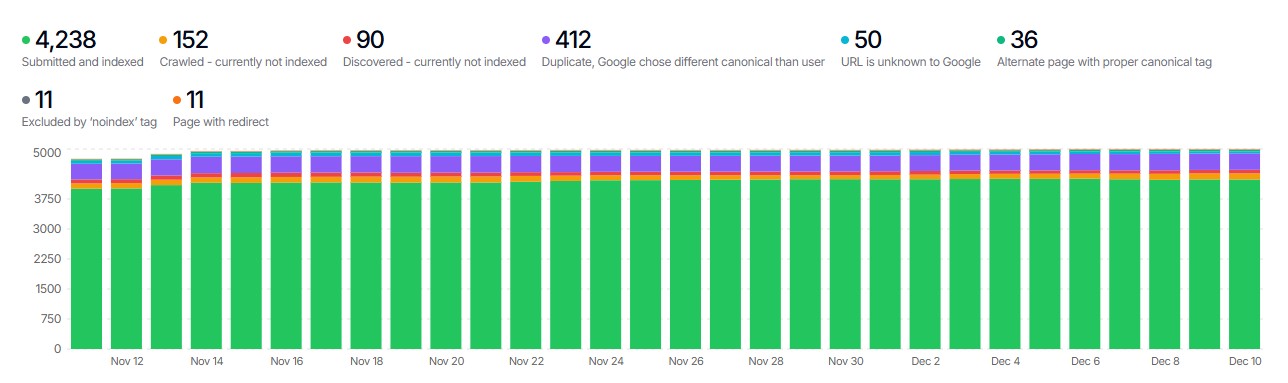
Recommended Tool: SEOGets
For a more powerful way to work with Search Console data, consider using SEOGets. Their Indexing report provides a more sophisticated view of your indexed pages than the native Search Console interface, making it easier to identify and export the URLs you need for redirect planning.
How Do I Gather URLs from Analytics?
Analytics data shows which URLs actually receive visitor traffic. These are your highest-priority redirect candidates.
Exporting from Google Analytics (GA4)
- Navigate to Reports → Engagement → Pages and screens
- Set date range to last 12-16 months
- Export the full page path report
Key Metrics to Capture
| Metric | Priority Indicator |
|---|---|
| Sessions | Overall traffic volume |
| Users | Unique visitor count |
| Engagement rate | Content quality signal |
| Conversions | Business value |
Creating Priority Tiers
Segment URLs by traffic volume:
| Monthly Sessions | Priority | Redirect Treatment |
|---|---|---|
| 1,000+ | Critical | Must redirect, verify destination |
| 100-999 | High | Must redirect |
| 10-99 | Medium | Should redirect |
| 1-9 | Low | Redirect if practical |
| 0 | Lowest | Redirect only if backlinks exist |
Don’t Forget Landing Pages
Filter for pages where users enter your site:
- These are often linked externally or bookmarked
- Losing landing pages has outsized traffic impact
- Prioritize redirects for top landing pages
Where Do I Find Existing 301 Redirect Tables?
Before creating new redirects, you must know what redirects already exist. Ignoring existing redirects creates chains that hurt SEO and performance.
Common Redirect Sources
| Source | Where to Find | Export Method |
|---|---|---|
| CMS Redirect Admin | WordPress, Shopify, etc. admin panel | Built-in export or database query |
| Redirect Plugins | Yoast, Redirection, Rank Math | Plugin settings → Export |
| Edge Services | Cloudflare, Fastly, Netlify | Dashboard → Rules → Export |
| Network Platforms | Load balancers, CDNs | Configuration files |
| Server Config | .htaccess, nginx.conf | Direct file access |
CMS-Specific Locations
WordPress:
- Redirection plugin: Tools → Redirection → Export
- Yoast Premium: SEO → Redirects → Export
- Database:
wp_redirection_itemstable
Shopify:
- Admin → Content → URL Redirects → Export
Webflow:
- Site Settings → Publishing → 301 Redirects
What to Document
For each existing redirect, capture:
| Field | Example |
|---|---|
| Source URL | /old-page |
| Destination URL | /new-page |
| Redirect Type | 301 or 302 |
| Location | Plugin, .htaccess, CDN |
| Date Created | 2024-03-15 |
What’s a Helpful Way to Use Redirect Chain Data?
Redirect chains occur when one redirect points to another redirect, creating multiple hops. These hurt SEO and page speed. Migration is the perfect time to eliminate them.
Identifying Redirect Chains
In Screaming Frog:
- Crawl your site
- Filter by Status Code → 3xx
- Look for redirects where Redirect URL is also a redirect
Chain example:
/page-a → 301 → /page-b → 301 → /page-c → 200

This is a 2-hop chain that should become:
/page-a → 301 → /page-c
/page-b → 301 → /page-c
The Chain Resolution Process
- Map all redirect chains: Document every A→B→C pattern
- Identify final destinations: Find where each chain ultimately leads
- Update source redirects: Point directly to final destination
- Remove intermediate redirects: Delete unnecessary hops
- Verify resolution: Test that chains are eliminated
Common Chain Scenarios
| Scenario | Before | After |
|---|---|---|
| HTTP to HTTPS to page | http→https→/new | http→/new (if HTTPS enforced at server) |
| Old redirect + new redirect | /old→/middle→/new | /old→/new, /middle→/new |
| WWW normalization chain | non-www→www→/page | non-www→/page (www at DNS level) |
How Do I Create a Unified URL Dataset?
After gathering URLs from all sources, combine them into a single, deduplicated dataset. This becomes your master redirect source list.
The Unification Process
Step 1: Standardize formats
- Remove protocols (
https://) - Remove domains (
www.example.com) - Standardize trailing slashes
- Convert to lowercase (if your site is case-insensitive)
Step 2: Validate through Screaming Frog
Run each URL list through Screaming Frog in List Mode:
- Mode → List
- Upload your URL list
- Start crawl to validate each URL
- Export results with status codes
This confirms the current status of every URL across all sources.
Step 3: Combine and deduplicate
Source A: 5,000 URLs
Source B: 3,500 URLs
Source C: 8,200 URLs
Source D: 2,100 URLs
─────────────────────
Combined: 18,800 URLs
After dedup: 12,400 unique URLs
Step 4: Enrich with metadata
Add columns from each source:
| URL | Status | Backlinks | Sessions | In Sitemap | Has Redirect |
|---|---|---|---|---|---|
| /page-a | 200 | 45 | 1,200 | Yes | No |
| /page-b | 404 | 12 | 0 | No | No |
| /page-c | 301 | 8 | 340 | Yes | Yes |
Ready to Map Your URLs?
Once you’ve gathered URLs from all sources and created your unified dataset, the next step is mapping old URLs to new destinations. If you’ve done redirect work before, you know this is traditionally the most time-consuming part of redirect work, but it doesn’t have to be.
Redirects.net uses intelligent matching algorithms to automatically map your old URLs to the best destinations on your new site. Upload your unified URL list, and get mapped redirects ready for implementation.