| Redirect Management Feature | Shopify Supported | Platform Limitation |
|---|---|---|
| Built-in redirect management system | ✓ | |
| Bulk CSV import for large migrations | ✓ | |
| Wildcard redirects | ✓ | |
| Domain alias redirects | ✓ | |
| Redirect chain prevention | ✓ | |
| External domain redirects | ✓ | |
| Total number of redirects | ✓ | |
| Character length of URLs | ✓ | |
| Case preservation in URLs | ✓ | |
| Flexible parameter matching | ✓ | |
| Preserve parameter order in URLs | ✓ |
Does Shopify Have a Built-In Redirect Management System?
Yes, Shopify provides a built-in redirect management system with two straightforward methods for creating redirects: individual creation through the admin interface and bulk CSV import for large-scale migrations.
Individual Redirect Creation
Best for:
- Single redirect creation
- Testing redirect behavior
- Quick fixes and updates
Bulk CSV Import
Best for:
- Large-scale migrations (hundreds or thousands of redirects)
- Multi-URL updates
- Systematic redirect planning
URL Path Requirements
“Redirect From” Field:
- Relative paths only (no domain name)
- Must start with forward slash
/ - Example:
/example_product.php
“Redirect To” Field:
- Relative OR absolute paths accepted
- Examples:
/new-pageorhttps://www.external.com/page
Automatic URL Reformatting
Shopify automatically reformats URLs during CSV import:
| Input Format | Shopify Converts To | Result |
|---|---|---|
https://www.redirects.net/resource |
/resource |
Strips to relative path |
www.redirects.net/unicode/test |
/www.redirects.net/unicode/test |
Adds leading slash |
redirects.net/nested/directory |
/redirects.net/nested/directory |
Adds leading slash |
Where to Find the Redirect Table
- From your Shopify admin, go to Content → Menus
- Click View URL Redirects
Are Wildcard Redirects Supported?
Server-side wildcard redirects are not supported natively by Shopify. However, client-side JavaScript wildcard redirects are possible through Liquid template customization or Shopify apps.
Understanding Wildcard Redirects
Wildcard redirects enable you to redirect multiple URLs matching a specific pattern using a single redirect rule. The wildcard character (*) matches any text in that position.
Example: One Rule Redirects All Blog Posts
Single wildcard rule (Apache .htaccess syntax):
RedirectMatch 301 ^/blog/(.*)$ /articles/$1
Or in Nginx:
rewrite ^/blog/(.*)$ /articles/$1 permanent;
Automatically redirects:
/blog/post1→/articles/post1/blog/post2→/articles/post2/blog/post3→/articles/post3/blog/summer-2024→/articles/summer-2024- …and hundreds or thousands more URLs with one rule
No Wildcard Redirects Executed Before Page Load
- Shopify does not support this functionality out of the box
- Shopify requires individual redirect records for each URL
Client-Side JavaScript Redirects Allowed
- JavaScript code that redirects after page loads
- Custom Liquid Templates - Add JavaScript to theme files
- Shopify Apps - Install third-party redirect apps
Are Top-Level Domain Alias Redirects Supported?
Shopify provides built-in domain management that allows you to configure multiple domains and automatically handle redirects between them. The platform orchestrates domain aliases through DNS settings and automatic HTTPS redirects.
Primary Domain Configuration
- One Primary Domain: You must designate one domain as your primary (canonical) domain
- Automatic Redirects: All other domains automatically redirect to the primary domain
- 301 Redirects: Shopify uses permanent 301 redirects to transfer SEO authority to the primary domain
- HTTPS Enforcement: SSL certificates are automatically provisioned and enforced across all domains
Adding Domain Aliases
Steps to configure domain aliases:
- Add Domain in Shopify Admin - Navigate to Settings → Domains
- Configure DNS Records - Point A records or CNAME to Shopify’s servers
- Set Primary Domain - Designate which domain should be canonical
- Automatic SSL - Shopify provisions SSL certificates for all connected domains
Server Requests Generated for Shopify Managed Domain and Sub-Domain Redirects
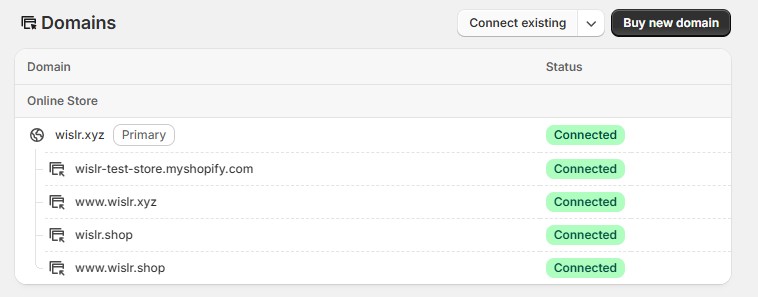
In the Shopify Domains interface shown above, wislr.xyz is designated as the Primary domain (indicated by the “Primary” badge). All other connected domains automatically redirect to this primary domain:
Domain configuration:
- Primary domain:
wislr.xyz← All traffic redirects here - Connected aliases (auto-redirect):
wislr-test-store.myshopify.com→wislr.xyz(301)www.wislr.xyz→wislr.xyz(301)wislr.shop→wislr.xyz(301)www.wislr.shop→wislr.xyz(301)
Understanding the redirect chain:
Shopify implements a two-step redirect process for domain aliases to ensure both security (HTTPS) and proper canonical URL structure:
Step 1: Protocol Upgrade (HTTP → HTTPS)
http://wislr.shop→ 301 redirect →https://wislr.shop
Step 2: Domain Redirect (Alias → Primary)
https://wislr.shop→ 301 redirect →https://wislr.xyz
Complete redirect flow example:
http://wislr.shop/products/shirt
  ↓ 301 (force HTTPS)
https://wislr.shop/products/shirt
  ↓ 301 (alias to primary)
https://wislr.xyz/products/shirt
  ↓ 200 (serves content)
Key behaviors:
- HTTP requests to aliases: 2-step redirect chain (protocol upgrade + domain redirect)
- HTTPS requests to aliases: 1-step redirect (domain redirect only)
- HTTPS requests to primary: Direct response (no redirect)
- All domains show “Connected” status, meaning SSL is active and redirects are working
- Only the primary domain serves actual content; all others perform instant 301 redirects
WWW vs Non-WWW
- Flexible Configuration: Choose either www or non-www as your primary
- Automatic Redirect: The non-primary version redirects automatically
- No Manual Rules Needed: Shopify handles this at the server level
- SEO Best Practice: Consistent with Google’s recommendations for canonical domains
Is There Built-In Redirect Chain Prevention?
Yes, Shopify automatically prevents redirect chains with intelligent built-in safeguards. The system will reject any redirect that would create a chain, displaying an error if you attempt to redirect to a URL that’s already configured in another redirect’s “Redirect from” field.
Understanding Redirect Chains
A redirect chain occurs when URLs redirect through multiple steps before reaching the final destination.
❌ Blocked Chain Attempt:
Shopify will prevent this configuration and display an error message:
| Redirect from | Redirect to |
|---|---|
/BOTH |
/SHORT |
/SHORT |
/homepage |
✅ Correct Configuration:
Both URLs redirect directly to the final destination:
| Redirect from | Redirect to |
|---|---|
/BOTH |
/homepage |
/SHORT |
/homepage |
Are There Reserved URL Values You Cannot Redirect?
Yes, Shopify reserves 4 specific URL prefixes that cannot be redirected. However, Shopify’s official documentation is outdated and lists many more prefixes as reserved than are actually restricted.
Reserved URL Prefixes
Only these 4 prefixes are actually blocked:
| URL Prefix | Behavior |
|---|---|
/cart |
Creates record but won’t redirect |
/products |
Creates record but won’t redirect |
/collections |
Creates record but won’t redirect |
/collections/all |
Creates record but won’t redirect |
URL Prefixes That Work (Despite Official Documentation)
These prefixes work correctly contrary to Shopify’s documentation:
| URL Prefix | Test Result |
|---|---|
/apps |
✅ Redirects work |
/application |
✅ Redirects work |
/carts |
✅ Redirects work |
/orders |
✅ Redirects work |
/services |
✅ Redirects work |
Subdirectory Taxonomy
Reserved prefixes work if used as subdirectories in a longer URL string:
| Redirect from | Redirect to | Result |
|---|---|---|
/cart/people |
/new-location |
✅ Works perfectly |
/products/people |
/new-location |
✅ Works perfectly |
/collections/people |
/new-location |
✅ Works perfectly |
The restriction only applies when these exact paths are used alone, not as parent directories.
Are There Limits on the Total Number of Redirects?
Yes, Shopify enforces strict maximum redirect counts that cannot be increased, regardless of business size or support requests. These limits are fixed by platform architecture.
Platform Limits
Standard Shopify Plans:
- Maximum: 100,000 redirects
- Suitable for small to medium migrations, single brand sites, and standard product catalogs
Shopify Plus:
- Maximum: 20,000,000 redirects
- Suitable for enterprise migrations, multi-brand consolidations, and massive URL restructures
Strategic Planning
When approaching redirect limits:
- Prioritize high-traffic URLs with significant organic traffic and backlinks
- Focus on revenue-generating pages first (products, categories)
- Monitor redirect usage regularly to track against platform limits
- Create a systematic hierarchy focusing on SEO and UX value
Are There Character Count Limits for Individual Redirect Entries?
Yes, Shopify enforces a 1,024 character maximum for URL redirect strings (including the leading ‘/’), which is not clearly documented in official resources.
Maximum Length: 1,024 characters (including the forward slash prefix)
Despite browsers supporting URLs up to 2,083 characters, Shopify’s platform limit is exactly 1,024 characters. This can cause unexpected failures during bulk imports.
Do URLs Get Transformed During Import?
No, Shopify preserves the exact case of URLs you enter in the redirect table and properly redirects all case variations to their specified destinations.
How Case Handling Works
Shopify allows you to create redirect entries with different case variations, and each entry functions independently:
/CASE/TEST.html→ redirects to its specified destination/case/test.html→ redirects to its specified destination/Case/Test.html→ redirects to its specified destination/CaSe/TeSt.HtMl→ redirects to its specified destination
What Happens with Multiple Case Variations
When you create redirect entries with different case variations of the same URL, each entry works independently. Shopify preserves the case you specify and properly handles redirects for each variation.
Example:
- If you create a redirect for
/Case/Test.html→/destination-a - And create a redirect for
/case/test.html→/destination-b - Both redirects will function as specified
- Each case variation redirects to its assigned destination
How Are Parameterized URLs Handled?
Shopify treats parameterized URLs as literal strings requiring exact matches, combined with automatic alphabetical parameter reordering.
Exact Match Requirement
Each unique parameter combination requires its own redirect record. Missing even a single parameter will result in a 404 error instead of a redirect.
Example
/how-is-pkl?utm_campaign=301s+in+2024&utm_content=blue&utm_id=3012024&utm_medium=display&utm_source=google&utm_term=redirects
If you have parameters as part of your URL string in the search index or as a backlink, you’ll need separate redirect entries for each parameter variation users might encounter.
Automatic Parameter Alphabetization
Shopify automatically alphabetizes URL parameters separated by ampersands (&) when creating redirect records, regardless of the order you specify. This can impact CMS platforms that rely on specific parameter sequences.
Reordering Examples:
| Your Input | Shopify Stores As |
|---|---|
/test?name=John&Doe |
/test?Doe&name=John |
/user?name=John&age=30&active=true |
/user?active=true&age=30&name=John |
/page?z=last&a=first&m=middle |
/page?a=first&m=middle&z=last |
What Shopify Apps Make Redirect Management Easier?
Apps can significantly streamline the process for complex site transitions with hundreds or thousands of URLs.
Redirects by WISLR
Key Features
Automated URL Matching
- Intelligent algorithm automatically matches old site URLs to new Shopify pages
- Processes bulk redirect mappings across all page types (products, collections, blogs, pages)
- Eliminates manual spreadsheet work for large-scale migrations
Flexible Export & Import
- CSV export functionality for reviewing and manually adjusting auto-generated mappings
- Direct bulk import connector to Shopify’s native redirect table
- Export live URL data from your existing site
Migration Workflow Optimization
- Identifies missing content in your new Shopify store before launch
- Process files up to 150,000 URLs at once (Unlimited plan)
- Operates directly within Shopify admin interface